
DATANAC
Binary
| Decimal | Binary |
| 0 | 0 |
| 1 | 1 |
| 2 | 10 |
| 3 | 11 |
| 4 | 100 |
| 7 | 111 |
| 8 | 1000 |
| 10 | 1010 |
| 16 | 10000 |
| 20 | 10100 |
Addition
Binary addition follows the same rules as addition in the decimal system except that rather than carrying a 1 over when the values added equal 10, carry over occurs when the result of addition equals 2. Refer to the example below for clarification.
Note that in the binary system:
0 + 0 = 0
0 + 1 = 1
1 + 0 = 1
1 + 1 = 0, carry over the 1, i.e. 10
| 10 | 11 | 11 | 10 | 1 | ||
| + | 1 | 0 | 1 | 1 | 1 | |
| = | 1 | 0 | 0 | 1 | 0 | 0 |
Binary arithmetic operators (Python oriented)
| Priority | Operator | Name | Example | Meaning | Result | Result Type |
| Highest | ** | Exponentiation | 2 ** 3 | 23 | 8 | int if both arguments are ints float otherwise |
| * | Multiplication | 2 * 3 | 2 × 3 | 6 | int if both arguments are ints float otherwise |
|
| / | Division | 4 / 2 | 4 ÷ 2 | 2.0 | always float raises ZeroDivisionError when divisor is zero |
|
| // | Integer division | 5 // 2 | 2 | int if both arguments are ints float otherwise raises ZeroDivisionError when divisor is zero |
||
| % | Remainder (modulo) | 5 % 2 | 5 mod 2 | 1 | int if both arguments are ints float otherwise raises ZeroDivisionError when divisor is zero |
|
| + | Addition | 2 + 1 | 2 + 1 | 3 | int if both arguments are ints float otherwise |
|
| Lowest | - | Subtraction | 2 - 1 | 2 − 1 | 1 | int if both arguments are ints float otherwise |
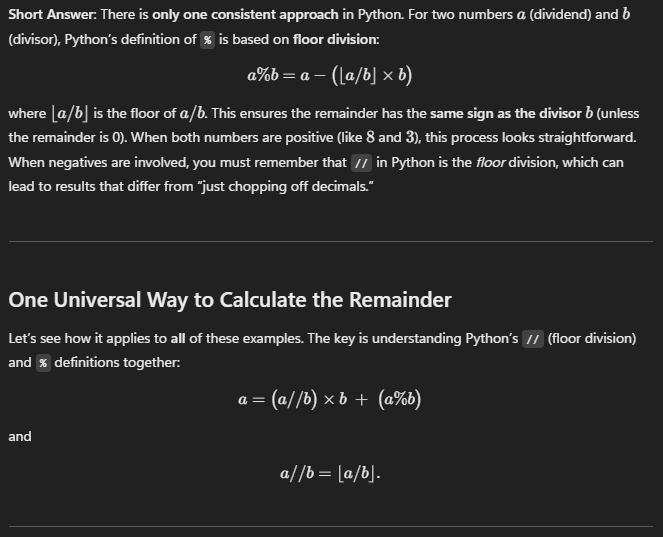
Modulo (Reminder) -> %
Derivative ƒ′(x)
| Notation | Name | Description |
| ƒ′(x) | 1st derivative (prime) | Rate of change of ƒ at x |
| ƒ″(x) | 2nd derivative (double prime) | Rate of change of ƒ′ at x |
| ƒ‴(x) | 3rd derivative (triple prime) | Rate of change of ƒ″ at x |
| ƒ(n)(x) | nth derivative | nth‐order rate of change of ƒ at x |
| ƒ̇(x) | Time derivative (dot) | Derivative of ƒ with respect to time |
| ƒ̈(x) | 2nd time derivative (double dot) | Second derivative of ƒ with respect to time |
| ∂ƒ(x)/∂x | Partial derivative | Rate of change of ƒ along one variable |
| ∇ƒ(x) | Gradient | Vector of all partials of ƒ |
| ∇²ƒ(x) | Laplacian | Divergence of ∇ƒ |
| dƒ(x)/dx | Leibniz notation | Derivative of ƒ with respect to x |
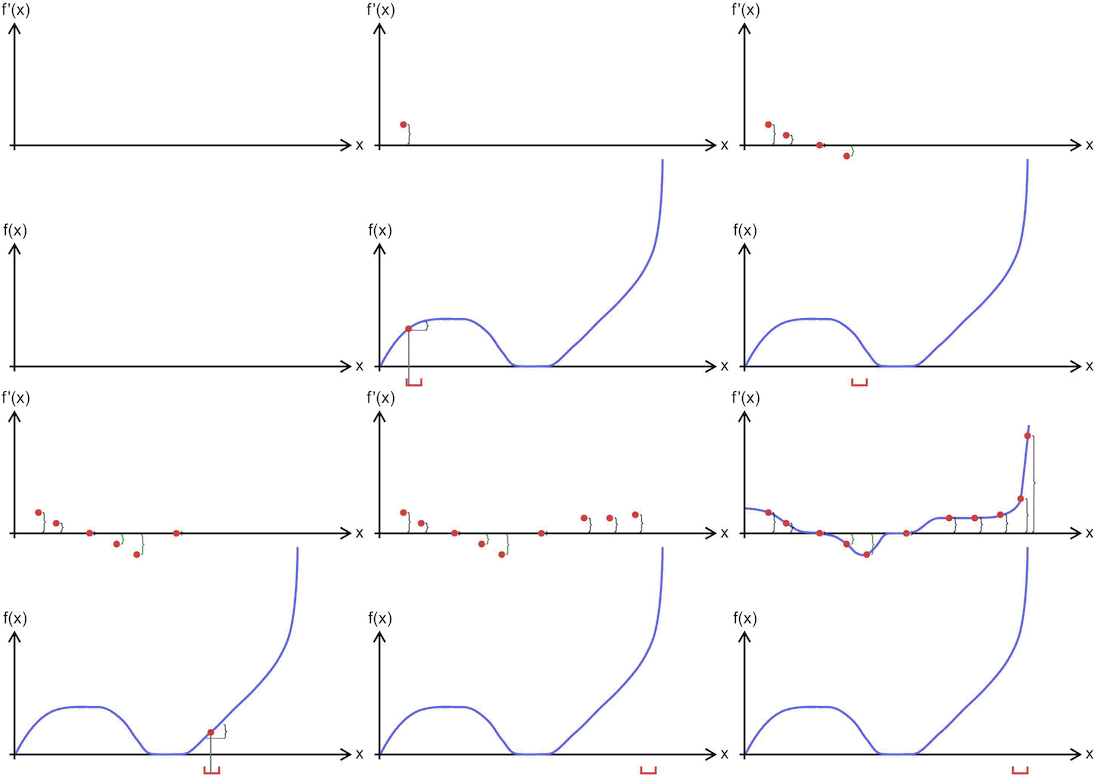
An animation that provides an intuitive sense of the derivative, since a function’s “swing” changes when its input (argument) changes.
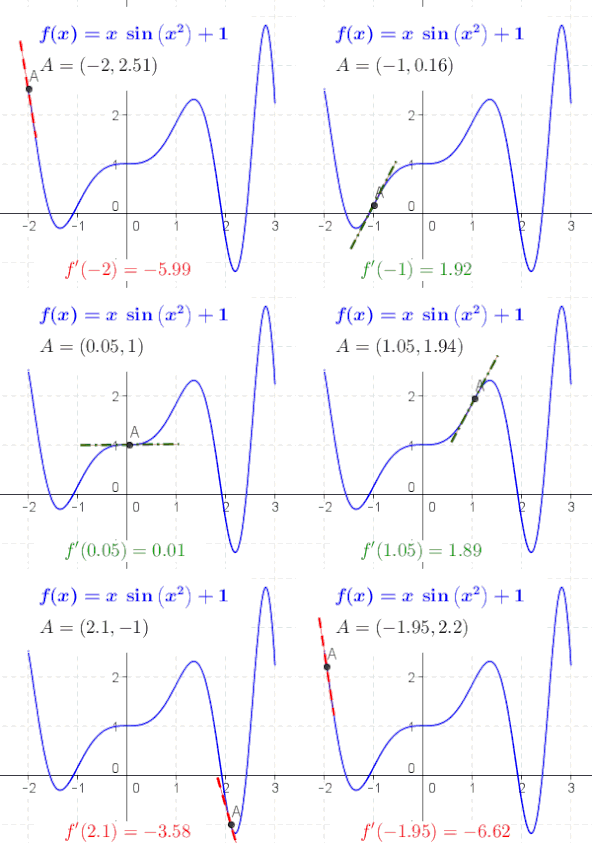
The derivative at different points of a differentiable function. In this case, the derivative is equal to

Online calculator
Pi π /paɪ/
The number pi (π) is a mathematical constant, approximately equal to 3.14159, that is the ratio of a circle's circumference to its diameter. It appears in many formulae across mathematics and physics, and some of these formulae are commonly used for defining π, to avoid relying on the definition of the length of a curve.
The brothers David and Gregory Volfovich Chudnovsky, born 1947 and 1952 respectively in Kyiv, Ukraine, are American mathematicians and engineers, who, in 1988 developped the ‘Chudnovsky Algorithm’ for the calculation of digits of π, based on Srinivasa Ramanujan’s π-formulae. The algorithm is based on the formula:

The Chudnovsky algorithm has been used for the World Record calculations of digits of π:
- 2.7 trillion digits in December 2009
- 10 trillion digits in October 2011
- 22.4 trillion digits in November 2016
- 31.4 trillion digits in September 2018–January 2019
- 50 trillion digits on January 29, 2020, and
- 62.8 trillion digits on August 14, 2021.
The last record, comprising exactly 62 831 853 071 794 digits (about 2π*10^13 digits), was achieved at the Computing Center of the University of Applied Sciences in Graubünden, Switzerland.
The hardware used for the number crunching comprises two AMD CPUs with 32 cores each, 1 TB of RAM, and a massive 510 TB of storage space. The π digits alone took up 63 TB.
All up, it took the team 108 days and nine hours to make the calculation.
Cryptography
| Concept | Description |
| Symmetric encryption | In this simple encryption method, only one secret key is used to both cipher and decipher information. Symmetric algorithms include AES-128, AES-192, and AES-256. Preferred for bulk data transmission due to speed and lower complexity. |
| Asymmetric encryption | Also known as public key cryptography, uses a pair of related keys (one public, one private). The public key encrypts data, and the private key decrypts it. Underlies SSL/TLS certificates used by websites. |
Data Encryption Standard (DES)
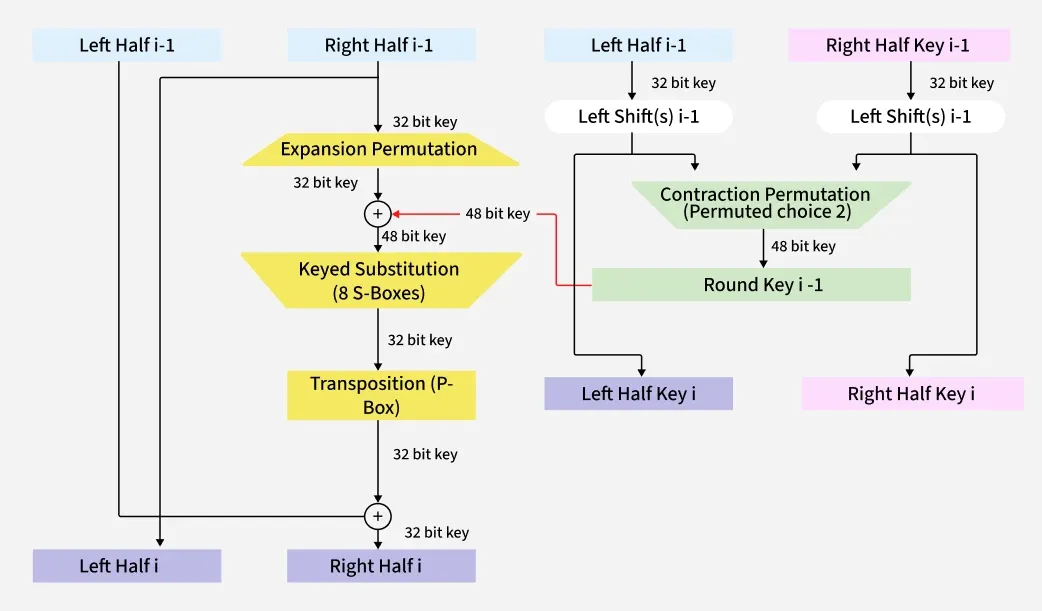
FIPS PUB 46-3 |
A deprecated symmetric-key algorithm adopted in 1977 for U.S. government data. Uses the same key to encrypt and decrypt; superseded by AES due to security weaknesses. |
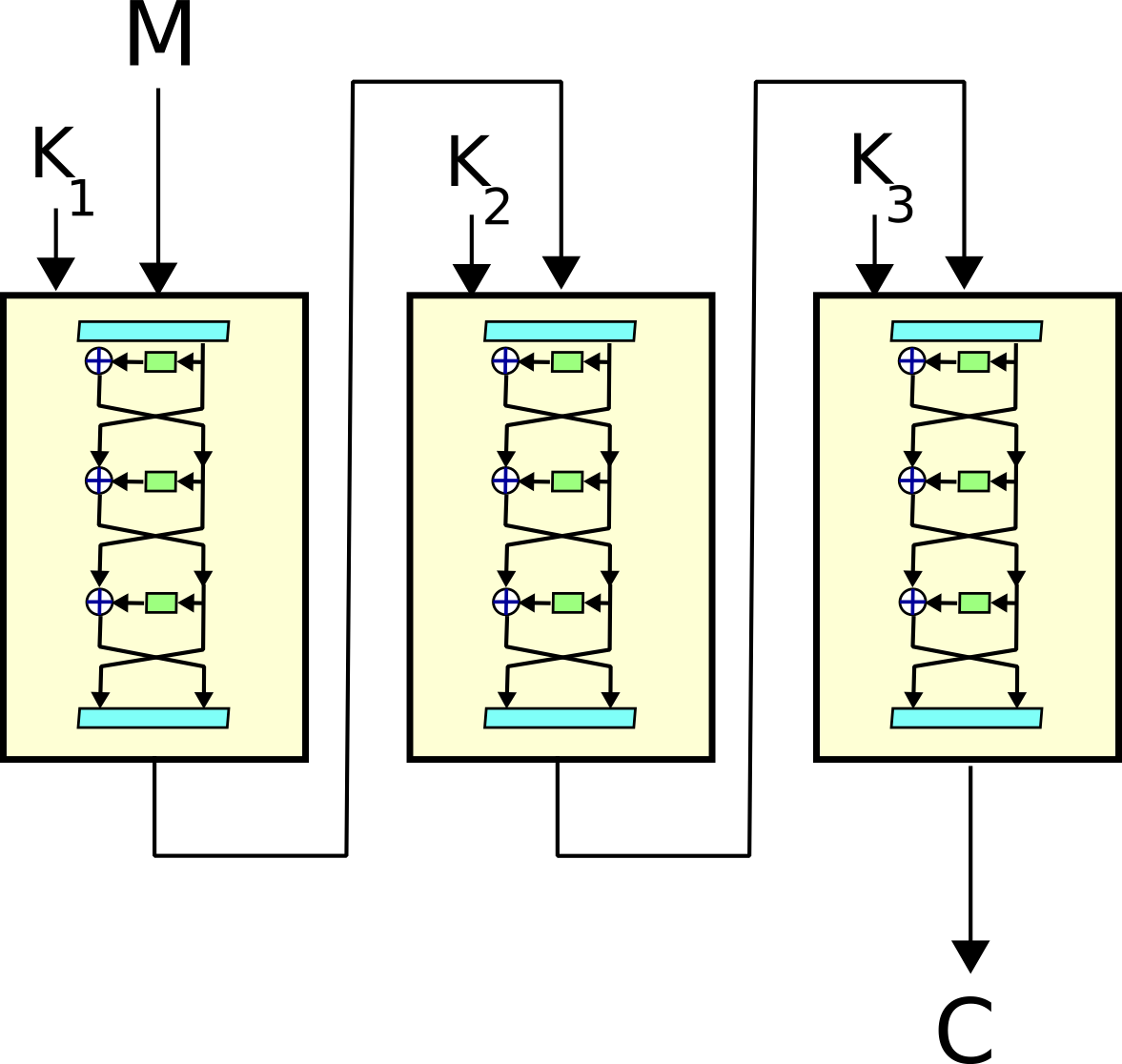
Triple DES (3DES)
FIPS PUB 46-3 |
Runs the DES algorithm three times with three separate keys. Introduced as a stopgap measure when single-DES became too weak, prior to widespread AES adoption. |
RSA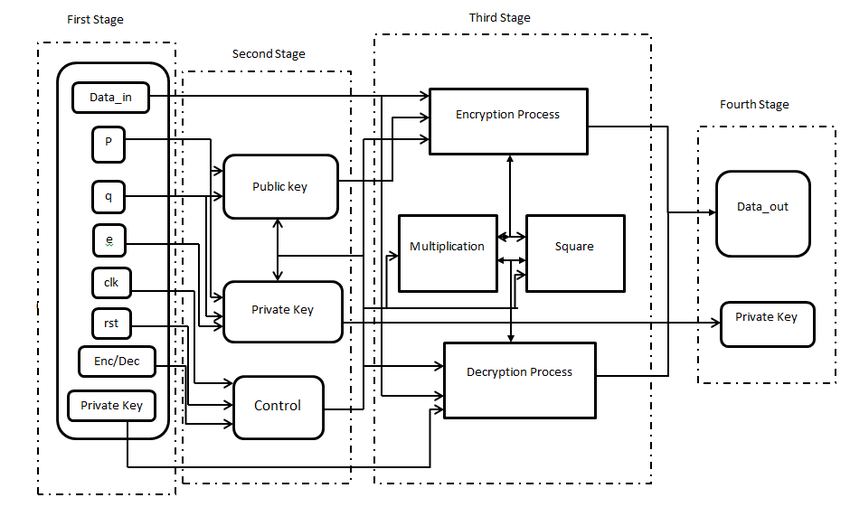
FIPS 186-5 |
Rivest-Shamir-Adleman algorithm forming the basis of a public-key cryptosystem. Enables secure key exchange and digital signatures, widely used in VPNs and browser HTTPS connections. |
Advanced Encryption Standard (AES)
_Round_Function.png)
FIPS 197 |
Selected by NIST in 2001 as the successor to DES. A block cipher supporting 128-, 192-, and 256-bit keys. Ubiquitous for protecting data at rest and in transit. |
| Encryption in the cloud | Cloud providers encrypt customer data before storage. Models include BYOE (bring your own encryption keys) and EaaS (Encryption as a Service) to meet varying security requirements. |
| End-to-End encryption (E2EE) | Ensures only the communicating endpoints can decrypt messages. Even intermediaries (ISPs, telecoms) cannot read the content. Used by services like WhatsApp for private messaging. |
SP 800 Series
| SP 800 Number | Title / Focus | Description |
| SP 800-38 series | Block-cipher Modes of Operation |
|
| SP 800-67 | Triple Data Encryption Algorithm (TDEA) | Guidance on 2- and 3-key Triple-DES for federal use |
| SP 800-56 series | Key-Establishment Schemes |
|
| SP 800-57 parts 1–3 | Key Management |
|
| SP 800-90 series | Random Number Generation |
|
| SP 800-131A | Transitioning Cryptographic Algorithms | Guidance on phasing out deprecated algorithms & key lengths |
| SP 800-108 | Key Derivation Functions | Recommendations for KDF constructions (e.g. counter-mode KDF) |
| SP 800-175B | Use of Crypto Standards in Federal Systems | Implementation guidance for NIST-approved cryptography |
| SP 800-133 | Cryptographic Key Generation | Best practices for generating secure cryptographic keys |
| Acronym | Description |
| AES | Advanced Encryption Standard |
| BYOE | Bring Your Own Encryption keys |
| CBC | Cipher Block Chaining |
| CCM | Counter with CBC-MAC |
| CMAC | Cipher-based Message Authentication Code |
| CFB | Cipher Feedback |
| CTR | Counter mode |
| DES | Data Encryption Standard |
| 3DES | Triple DES (applies DES three times) |
| DRBG | Deterministic Random Bit Generator |
| E2EE | End-to-End Encryption |
| EaaS | Encryption as a Service |
| ECB | Electronic Codebook |
| FIPS | Federal Information Processing Standards |
| GCM | Galois/Counter Mode |
| HMAC | Hash-based Message Authentication Code |
| HTTPS | Hypertext Transfer Protocol Secure |
| ISP | Internet Service Provider |
| IDS | Intrusion Detection System |
| IPS | Intrusion Prevention System |
| IDPS | Intrusion Detection and Prevention System |
| NIDS | Network Intrusion Detection System |
| NIPS | Network Intrusion Prevention System |
| NIDPS | Network Intrusion Detection and Prevention System |
| HIDS | Host-based Intrusion Detection System |
| HIPS | Host-based Intrusion Prevention System |
| HIDPS | Host-based Intrusion Detection and Prevention System |
| KDF | Key Derivation Function |
| NIST | National Institute of Standards and Technology |
| OFB | Output Feedback |
| RSA | Rivest–Shamir–Adleman |
| SDC | Secure Data Communications |
| SP | Special Publication (NIST) |
| TDEA | Triple Data Encryption Algorithm |
| TLS | Transport Layer Security |
| VPN | Virtual Private Network |
Programming and OOP
Programming languages timeline
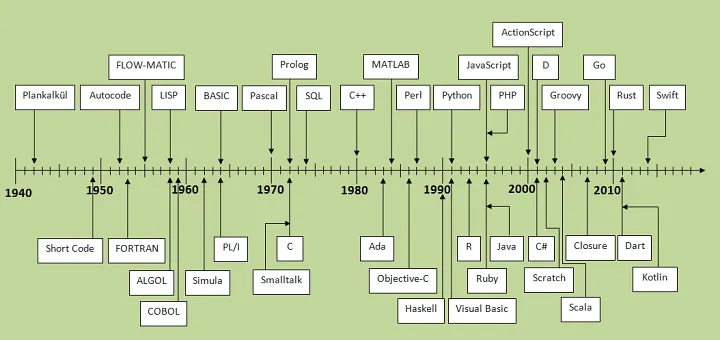
Programming languages
| Year | Language | Creator | Type | Description | Example |
| 1945 | Plankalkül | Konrad Zuse | Procedural / Algorithmic | First high-level programming language, designed for engineering/scientific calculations; introduced arrays, records and structured data. |
V0 ← 0
|
| 1949 | Short Code | John Mauchly | Interpreted | One of the very first high-level languages (for UNIVAC I); used alphanumeric tokens to express arithmetic and logical operations, with a runtime translator converting them into machine code. |
S = A + B * C
|
| 1952 | Autocode | Alick Glennie | Procedural (Compiled) | One of the first high-level compiled languages for the Manchester Mark I, using mnemonic codes to represent arithmetic and memory operations. |
LOAD A
|
| 1957 | FORTRAN | John Backus | Procedural (Compiled) | First high-level programming language, optimized for numeric and scientific computing; introduced the concept of compiling human-readable code into efficient machine instructions. |
PRINT *, "Hello, World!"
|
| 1959 | FLOW-MATIC | Grace Hopper & Remington Rand | Procedural (Interpreted) | First English-like data processing language for business applications; directly influenced the development of COBOL. |
COMPUTE TOTAL = PRICE * QUANTITY
|
| 1958 | LISP | John McCarthy | Functional | Pioneered list processing, symbolic computation, and recursion. | (print "Hello, World!") |
| 1958 | ALGOL | IFIP/POPP | Procedural | Introduced block structure and lexical scope; basis for many later languages. | begin print("Hello, World!"); end; |
| 1959 | COBOL | Grace Hopper & CODASYL (Conference on Data Systems Languages) | Procedural | Designed for business data processing with English-like syntax. | DISPLAY "Hello, World!". |
| 1964 | BASIC | John Kemeny & Thomas Kurtz | Procedural / Interpreted | Beginner’s All-purpose Symbolic Instruction Code; designed for easy use by students in interactive time-sharing. | PRINT "Hello, World!" |
| 1964 | PL/I | IBM | Procedural / Multi-paradigm | Combined features of scientific (FORTRAN) and business (COBOL) languages into a universal programming language. | PUT SKIP LIST('Hello, World!'); |
| 1967 | Simula | Ole-Johan Dahl & Kristen Nygaard | Object-oriented / Simulation | First object-oriented language; introduced classes, objects, and inheritance for simulation modeling. |
OutText("Hello, World!");
|
| 1970 | Pascal | Niklaus Wirth | Procedural (Compiled) | Created for teaching structured programming and data structures; enforces strong typing and block structure. | writeln('Hello, World!'); |
| 1972 | Prolog | Alain Colmerauer & Robert Kowalski | Logic | Logic programming language for symbolic computation and artificial intelligence; programs consist of facts and rules. | ?- write('Hello, World!'). |
| 1972 | Smalltalk | Alan Kay, Dan Ingalls & Adele Goldberg | Object-oriented | Pure object-oriented language where everything is an object; pioneered MVC and live programming environments. | Transcript show: 'Hello, World!'. |
| 1972 | C | Dennis Ritchie | Procedural (Compiled) | Systems programming language offering low-level access to memory, simple syntax, and efficient compiled code. |
#include <stdio.h>
|
| 1974 | SQL | Donald D. Chamberlin & Raymond F. Boyce | Declarative / Query | Standard language for defining, manipulating, and querying relational databases using set-based operations. | SELECT 'Hello, World!'; |
| 1980 | Ada | Jean Ichbiah | Procedural / Structured / Concurrent | Designed by the DoD for embedded and real-time systems; strong typing, modularity, and built-in concurrency. |
with Ada.Text_IO; use Ada.Text_IO;
|
| 1984 | MATLAB | Cleve Moler | Procedural / Numeric | High-level language and environment for numerical computing, visualization, and programming; emphasizes matrix and linear algebra operations. | disp('Hello, World!'); |
| 1984 | Objective-C | Brad Cox & Tom Love | Object-oriented / Dynamic | Superset of C adding Smalltalk-style messaging and dynamic runtime features. |
#import <Foundation/Foundation.h>
|
| 1985 | C++ | Bjarne Stroustrup | Multi-paradigm (Object-oriented, Generic) | Extension of C with classes, templates, and exception handling; supports generic, object-oriented, and functional programming styles. |
#include <iostream>
|
| 1987 | Perl | Larry Wall | Scripting / Dynamic | Practical Extraction and Report Language; excels at text processing with built-in regular expressions. | print "Hello, World!\n"; |
| 1990 | Haskell | Haskell Committee (Simon Peyton Jones, Philip Wadler, et al.) | Functional | Standardized purely functional, lazy language with strong static typing and type inference. | main = putStrLn "Hello, World!" |
| 1991 | Python | Guido van Rossum | Multi-paradigm (Object-oriented, Imperative, Functional) | Emphasizes readability, simplicity, and a vast standard library; widely used for automation, web development, and data science. | print("Hello, World!") |
| 1991 | Visual Basic | Alan Cooper & Microsoft | Event-driven / RAD | Designed for rapid application development of graphical user interfaces on Windows. | MsgBox "Hello, World!" |
| 1993 | R | Ross Ihaka & Robert Gentleman | Statistical / Functional | Language and environment for statistical computing and graphics; widely used for data analysis and visualization. | print("Hello, World!") |
| 1995 | Ruby | Yukihiro “Matz” Matsumoto | Multi-paradigm (Object-oriented, Functional) | Dynamic, reflective language designed for programmer happiness; everything is an object. | puts "Hello, World!" |
| 1995 | Java | James Gosling & Sun Microsystems | Object-oriented (Class-based) | “Write Once, Run Anywhere” language executed on the Java Virtual Machine; strong static typing. | System.out.println("Hello, World!"); |
| 1995 | JavaScript | Brendan Eich & Netscape | Multi-paradigm (Event-driven, Functional, Prototype-based) | Client-side scripting language for the web; first-class functions and dynamic typing. | console.log("Hello, World!"); |
| 1995 | PHP | Rasmus Lerdorf | Scripting (Server-side) | Embedded web scripting language for creating dynamic pages; later evolved into a full-featured general-purpose language. | <?php echo "Hello, World!"; ?> |
| 1996 | ActionScript | Macromedia | Scripting (ECMAScript-based) | Client-side scripting language for Adobe Flash; adds interactivity and animation to multimedia content. | trace("Hello, World!"); |
| 2000 | C# | Anders Hejlsberg & Microsoft | Multi-paradigm (Object-oriented, Component-oriented) | Developed by Microsoft for the .NET framework; strongly-typed, component-oriented language for building enterprise and desktop applications. |
using System;
|
| 2001 | D | Walter Bright | Multi-paradigm (Systems, Object-oriented) | Combines the performance of C++ with modern features like garbage collection, design-by-contract, and simplified syntax. |
import std.stdio;
|
| 2003 | Groovy | James Strachan & Apache | Multi-paradigm (Object-oriented, Scripting) | Dynamic language for the JVM with concise syntax, closures, and powerful DSL capabilities. | println 'Hello, World!' |
| 2004 | Scala | Martin Odersky | Multi-paradigm (Functional, Object-oriented) | Combines object-oriented and functional programming in a concise, statically-typed language on the JVM. | object HelloWorld extends App { println("Hello, World!") } |
| 2007 | Scratch | MIT Media Lab | Visual (Educational) | Block-based language designed to teach coding concepts through interactive animations and games. |
when green flag clicked
|
| 2007 | Clojure | Rich Hickey | Functional (Lisp dialect) | Modern Lisp dialect on the JVM emphasizing immutability, concurrency, and functional programming. | (println "Hello, World!") |
| 2009 | Go | Rob Pike, Ken Thompson & Robert Griesemer | Concurrent / Compiled | Designed at Google for simplicity, fast compilation, and built-in concurrency with goroutines and channels. | fmt.Println("Hello, World!") |
| 2010 | Rust | Graydon Hoare & Mozilla | Systems / Multi-paradigm | Focuses on memory safety without garbage collection, using ownership and borrowing to prevent data races. | println!("Hello, World!"); |
| 2011 | Dart | Lars Bak & Kasper Lund (Google) | Object-oriented / Compiled | Optimized for client-side development—web & mobile—with both ahead-of-time and just-in-time compilation. | void main() => print('Hello, World!'); |
| 2011 | Kotlin | JetBrains (Andrey Breslav lead) | Statically-typed / JVM & Multi-platform | Concise, null-safe language for the JVM and beyond; features type inference, coroutines, and seamless Java interop. | fun main() { println("Hello, World!") } |
| 2014 | Swift | Apple (Chris Lattner lead) | Compiled / Multi-paradigm | Modern language for iOS/macOS development with safety features (optionals, strict typing), fast performance, and expressive syntax. | print("Hello, World!") |
OOP base concepts
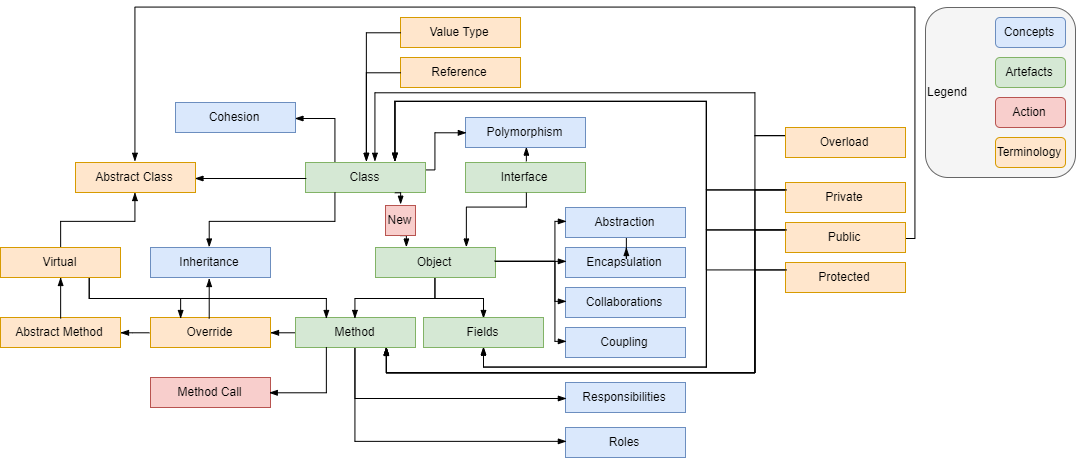
OOP implementation
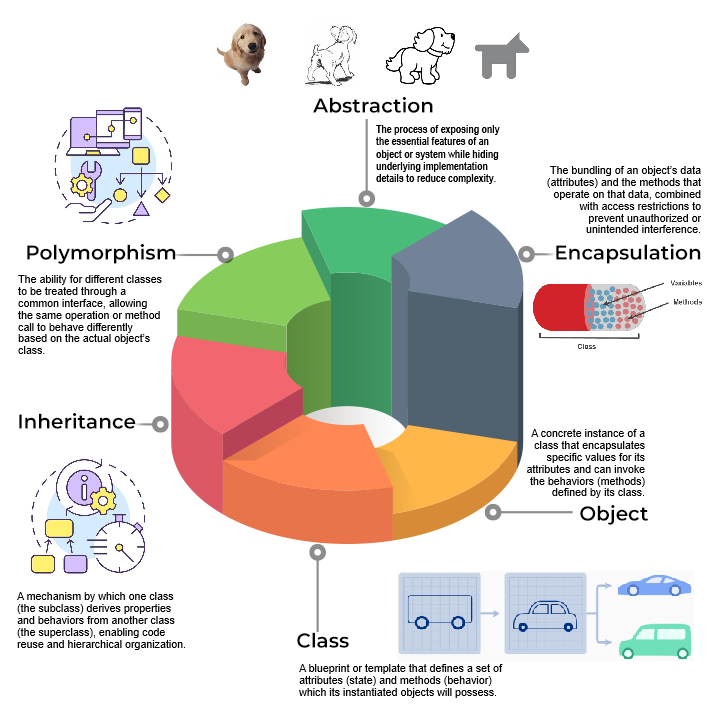
OOP pillars
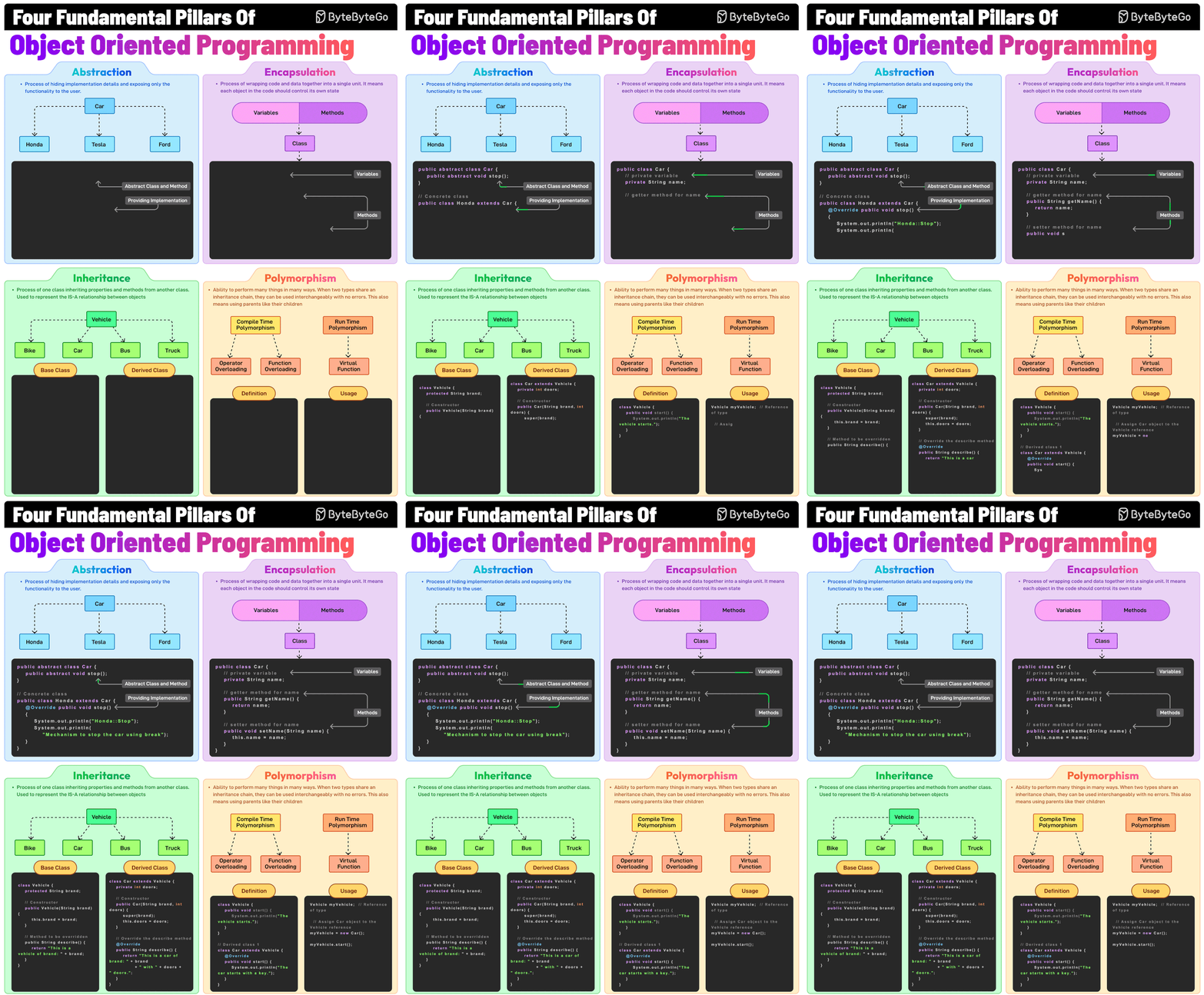
Control Logic
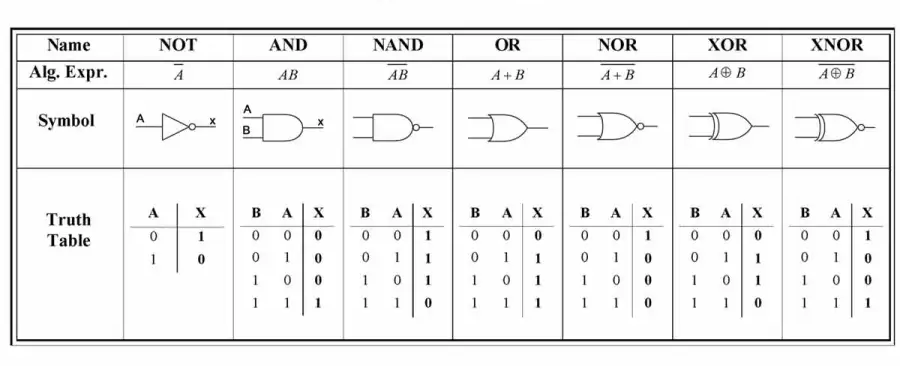
Logic Gates
| Symbol | Name | Description | Algorithmic expression | Truth Table |
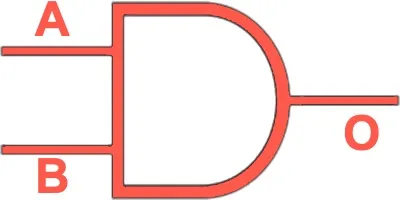 |
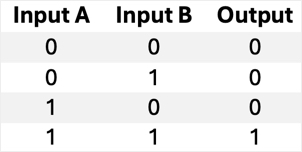
AND | Outputs 1 only if both inputs are 1. | 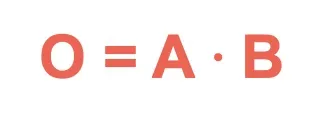 |
 |
 |
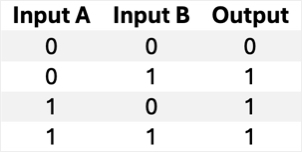
OR | Outputs 1 if at least one input is 1. | 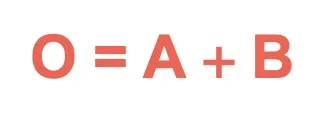 |
 |
 |
NOT | Inverts the input (0 → 1, 1 → 0). |  |
 |
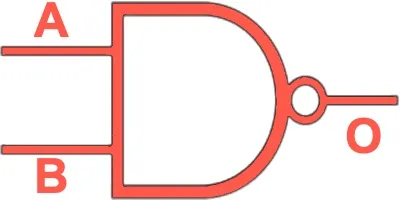 |
NAND | Outputs 0 only if both inputs are 1 (inverse of AND). | 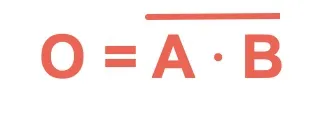 |
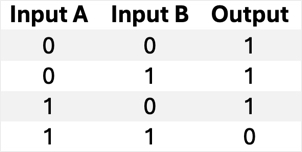 |
 |
NOR | Outputs 1 only if both inputs are 0 (inverse of OR). | 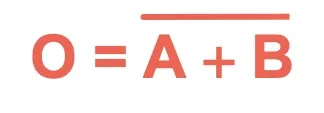 |
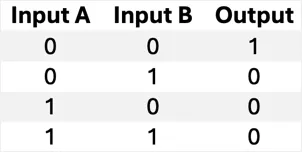 |
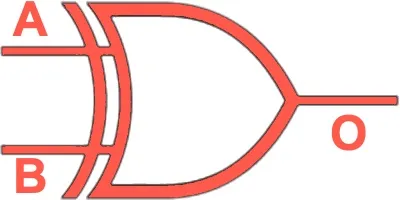 |
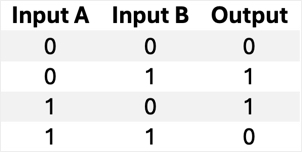
XOR | Outputs 1 if inputs are different. | 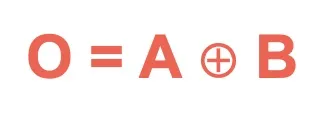 |
 |
 |
XNOR | Outputs 1 if inputs are the same (inverse of XOR). | 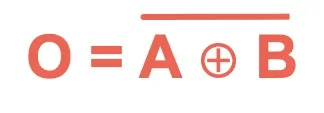 |
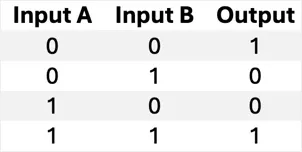 |
| Gate | TTL Part No. | # of Gates per DIP | CMOS Part No. | # of Gates per DIP |
| AND | 7408 (SN7408) | 4 × 2-input AND | 4081 | 2 × 2-input AND |
| OR | 7432 (SN7432) | 4 × 2-input OR | 4071 | 2 × 2-input OR |
| NOT (Inverter) | 7404 (SN7404) | 6 × inverter | 4069 | 6 × inverter |
| NAND | 7400 (SN7400) | 4 × 2-input NAND | 4011 | 2 × 2-input NAND |
| NOR | 7402 (SN7402) | 4 × 2-input NOR | 4001 | 2 × 2-input NOR |
| XOR | 7486 (SN7486) | 4 × 2-input XOR | 4030 | 2 × 2-input XOR |
| XNOR | 74266 (SN74266) | 4 × 2-input XNOR | 4077 | 2 × 2-input XNOR |
Ovation Transfer with tracking
The TRANSFER algorithm performs a transfer between the two inputs. The output is equal to the IN2 input if the digital input FLAG is TRUE, and the IN1 input if the digital input FLAG is FALSE. If the algorithm generates an invalid output value for the selected input, the other input is selected, and the algorithm generates a valid output value if the input for the other point is valid. The algorithm automatically performs a bumpless transfer between the track input and the selected input when a tracking request is removed. The algorithm ramps to the selected input (IN1 or IN2) at the specified track ramp rate (TRR1 or TRR2). Internal tracking may be selected to allow a bumpless transfer between IN1 and the IN2 inputs. Individual track ramp rates may be initialized to ramp from the IN1 to the IN2 and from the IN2 to the IN1.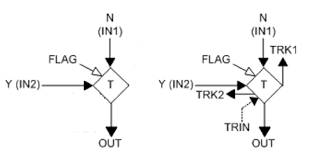
Ovation PID enhancements
proportional-integral-derivative controller (or three-term controller)
Ovation UTC converter
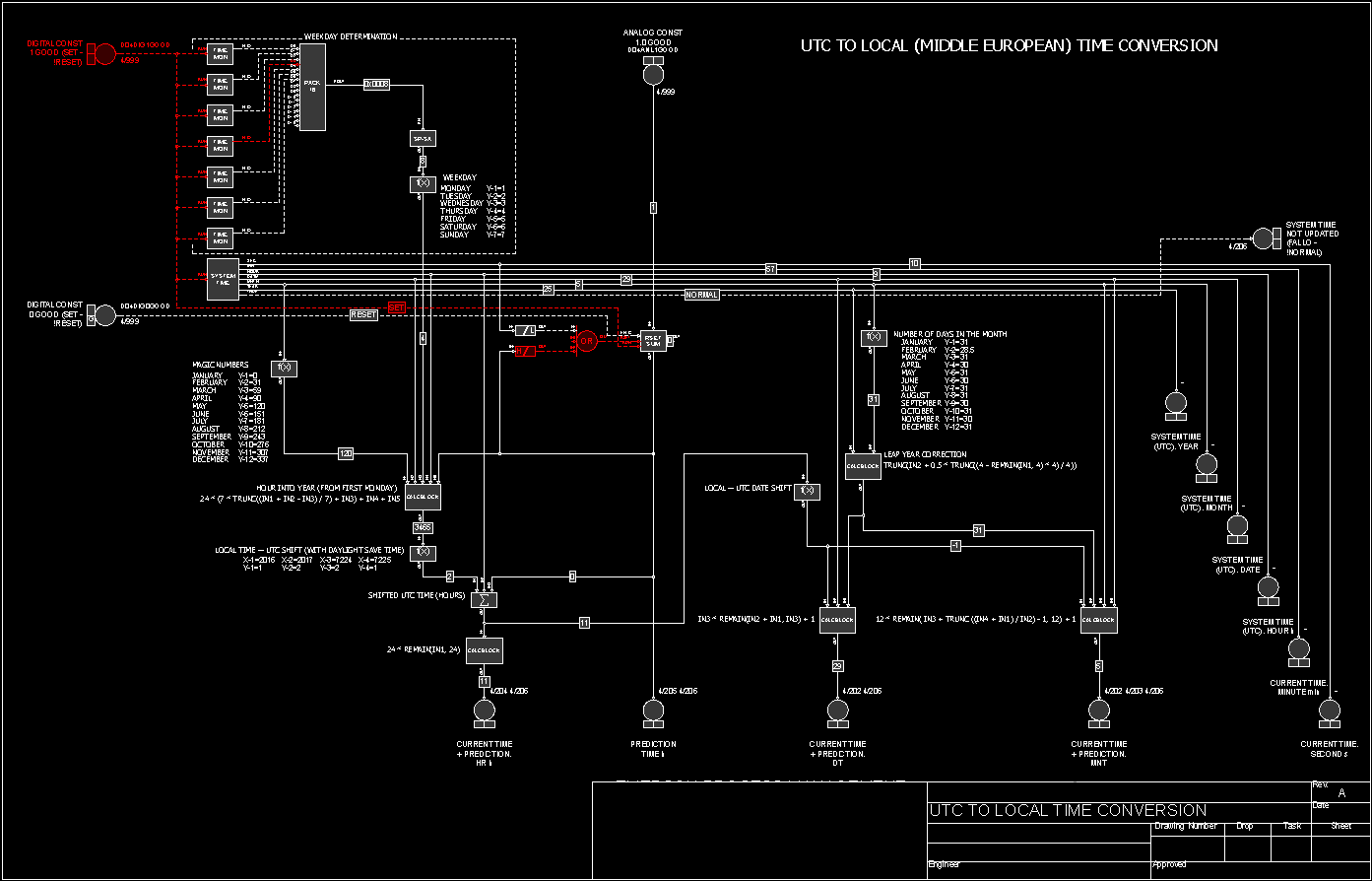
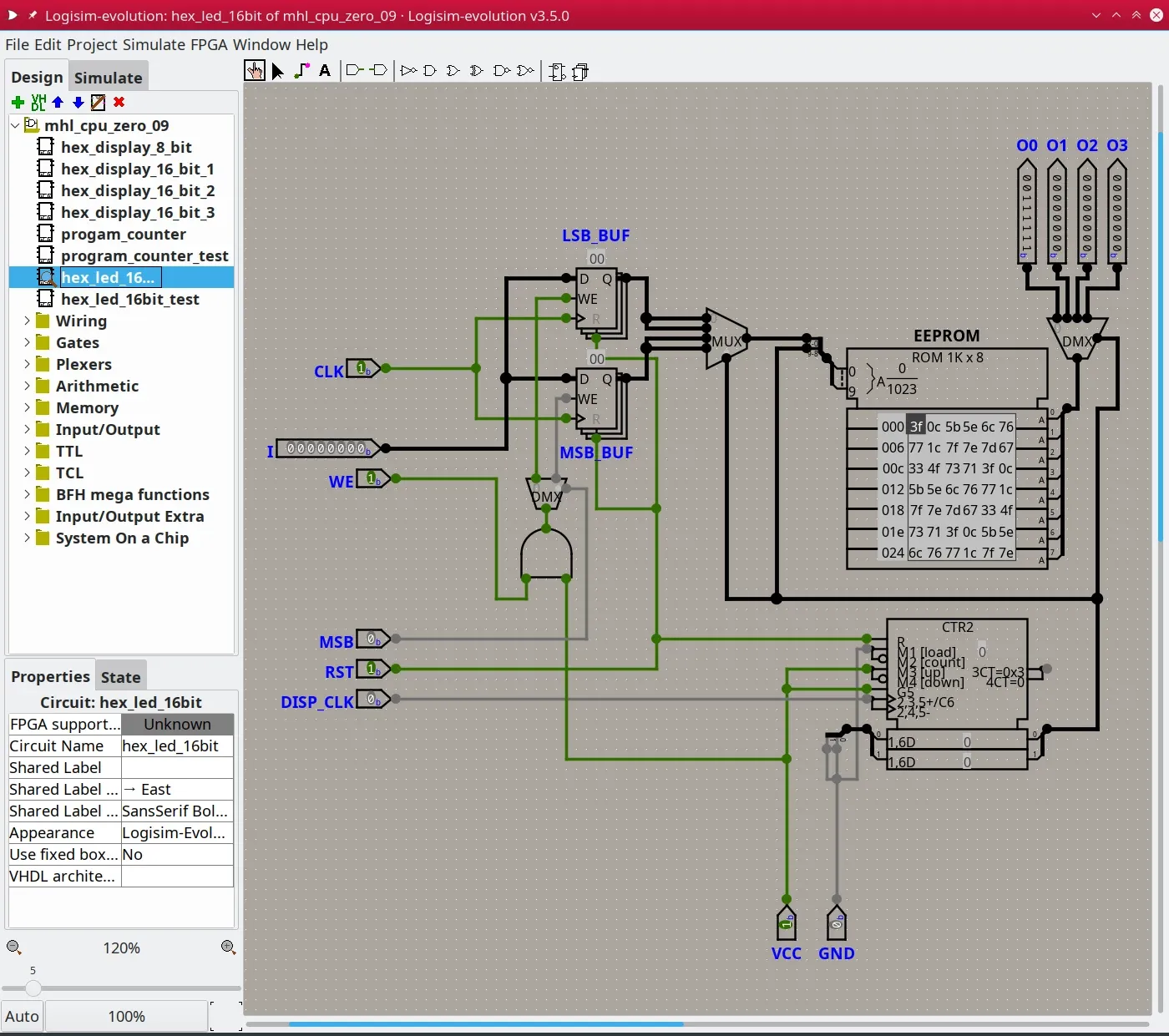
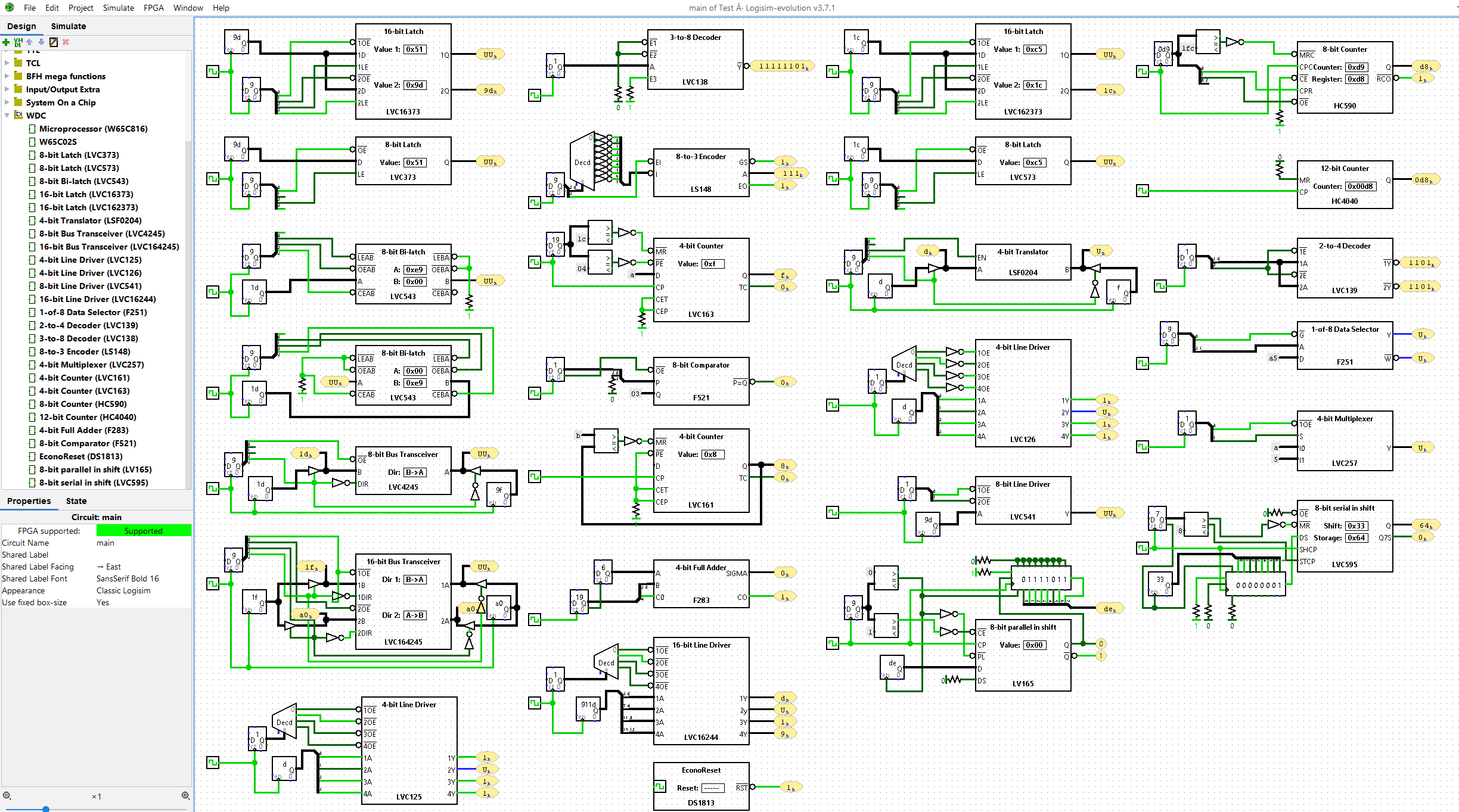
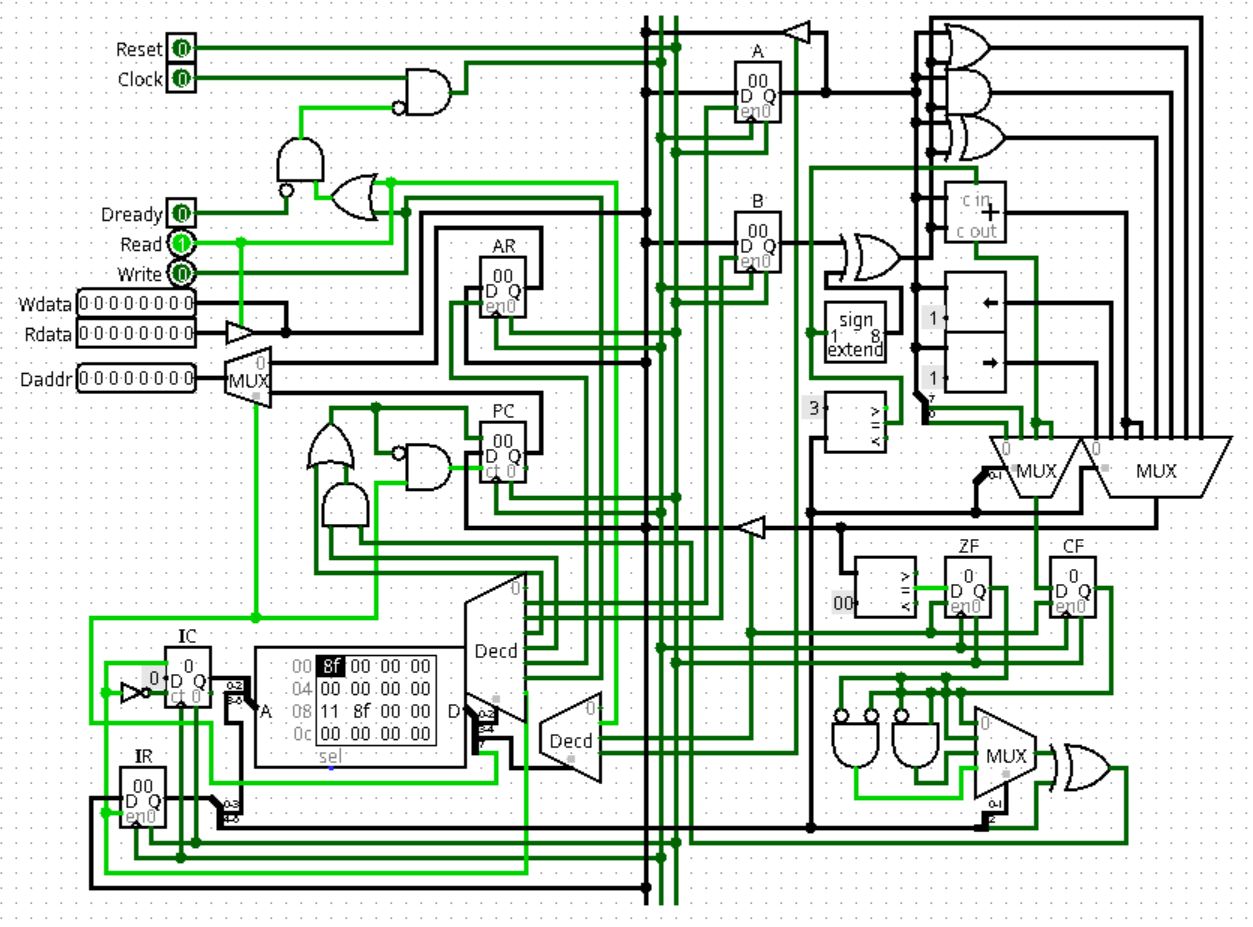
Control logic examples
UNIX
| COMMAND | DESCRIPTION |
| uname | Show the Unix system information. |
| uname -a | Detailed Unix system information. |
| uname -r | Kernel release information, such as kernel version. |
| uptime | Show how long the system is running and load information. |
| who | Display who is logged in. |
| w | Display what users are online and what they are doing. |
| users | List current users. |
| whoami | Display what user you are logged in as. |
| su | Superuser; use this before a command that requires root access
(e.g. su shutdown). |
| cal | Show calendar where the current date is highlighted. |
| date | Show the current date and time of the machine. |
| halt | Stop the system immediately. |
| shutdown | Shut down the system. |
| reboot | Restart the system. |
| last reboot | Show reboot history. |
| man COMMAND | Shows the manual for a given COMMAND. To exit the manual, press “q”. |
DOS
| Files and Folders Management Commands | Description |
| COPY | Copies files to another location. |
| DIR | Displays files and folders in the current directory. |
| DEL or ERASE | Deletes files. |
| EDIT | Starts the file editor. |
| CD | Changes directory. |
| EXPAND | Decompresses compressed files. |
| FC | Compares files and shows the differences between them. |
| FIND | Finds a text string in a file. |
| MD or MAKEDIR | Creates a new folder. |
| MOVE | Moves files from one folder to another. |
| Prints out the contents of a text file. | |
| RD or RMDIR | Deletes a folder. |
| REN or RENAME | Renames a file or folder. |
| REPLACE | Replaces files in one directory with files of the same name in another directory (overwrites). |
| ROBOCOPY | Uses an advanced tool to copy files and directories. |
| TREE | Displays the directory structure of a disk or folder. |
| TYPE | Displays the contents of text files. |
| OPENFILES | Manages opened local or network files. |
| XCOPY | Copies files and directory trees, often used for more complex copy operations. |
| Applications and Processes Commands | Description |
| SCHTASKS | Executes a command or starts a scheduled application (Task Scheduler). |
| SHUTDOWN | Shuts down or reboots your computer. |
| TASKLIST | Lists the tasks being performed on your computer. |
| TASKKILL | Stops or halts a task (requires the Task ID or PID, which can be found with TASKLIST). |
| REG | Starts the registry editor. |
| RUNAS | Launches a task as another user. |
| Disks Management Commands | Description |
| CHKDISK | Checks disk integrity and shows statistics. |
| DEFRAG | Starts disk defragmentation. |
| CHKNTFS | Displays or changes execution of disk check at boot. |
| COMPACT | Displays and changes the compression of files in NTFS partitions. |
| CONVERT | Converts FAT disk volume to NTFS. |
| DISKPART | Displays and adjusts disk partition properties. |
| FORMAT | Formats a disk or partition. |
| FSUTIL | Displays and configures file system properties. |
| LABEL | Creates, changes, or deletes a disk volume label. |
| RECOVER | Recovers data from a damaged or bad disk. |
| VOL | Displays the volume label and serial number of the disk. |
| System Information Commands | Description |
| DATE | Outputs or sets the current date. |
| TIME | Displays or sets the system time. |
| DRIVERQUERY | Displays the current state and properties of device drivers. |
| HOSTNAME | Displays the name of the computer. |
| SYSTEMINFO | Shows configuration information about your computer. |
| VER | Allows you to view the Windows version. |
| GPRESULT | Displays the currently applied group policies (RSoP). |
| GPUPDATE | Updates group policies. |
| Network Management Commands | Description |
| IPCONFIG | Shows information about network interfaces and IP configuration. |
| PING | Sends ICMP requests to the target host to check its availability. |
| TRACERT | Finds the network path for packets traveling to a destination. |
| NSLOOKUP | Finds the IP address for a resource name. |
| ROUTE | Displays network route tables. |
| ARP | Displays a table with IP addresses converted into physical (MAC) addresses. |
| NETSH | Starts the network settings control program. |
| GETMAC | Displays the MAC address of the network adapter. |
| TFTP | Starts the TFTP client in the command prompt. |
| Command Line Setup Commands | Description |
| CLS | Clears the screen. |
| CMD | Opens another command prompt window. |
| COLOR | Sets the text and background color in the command prompt. |
| PROMPT | Changes the command line prompt. |
| TITLE | Assigns a title to the current command prompt session. |
| HELP | Launches the CMD help interface. |
| EXIT | Exits the command prompt. |
PS
| Command | Description |
| Get-Service | Retrieve information about services |
| Get-Process | Retrieve information about processes |
| Get-EventLog | Retrieve information from event logs |
| Set-ExecutionPolicy | Modify the script execution policy |
| Test-Connection | Test the connectivity to a remote computer |
| Out-File | Write PowerShell output to a file |
| Get-Help | Display information about concepts and commands |
| Get-History | Retrieve recent commands in your current session |
| Get-Command | Retrieve all available PowerShell commands |
| ConvertTo-HTML | Create an HTML file from PowerShell output |
| Copy-Item | Copy a file to a specific location |
| Clear-History | Clear entries from your command history |
| Add-History | Add entries to your command history |
| Format-Table | Format PowerShell output as a table |
| Format-List | Format PowerShell output as a list |
| Clear-Content | Retain an item while deleting the contents of that item |
| Checkpoint-Computer | Set a restore point on your machine |
| ForEach-Object | Perform an operation on each item in a specified group |
| Where-Object | Select objects with a certain property |
| Select-Object | Select specific properties of an object or group of objects |
| Write-Progress | Display a progress bar in a PowerShell window |
| Debug-Process | Attach a debugger to a running process |
| Get-WinEvent | Display Windows event logs |
| Wait-Job | Suppress the command prompt until background jobs finish running |
OSI
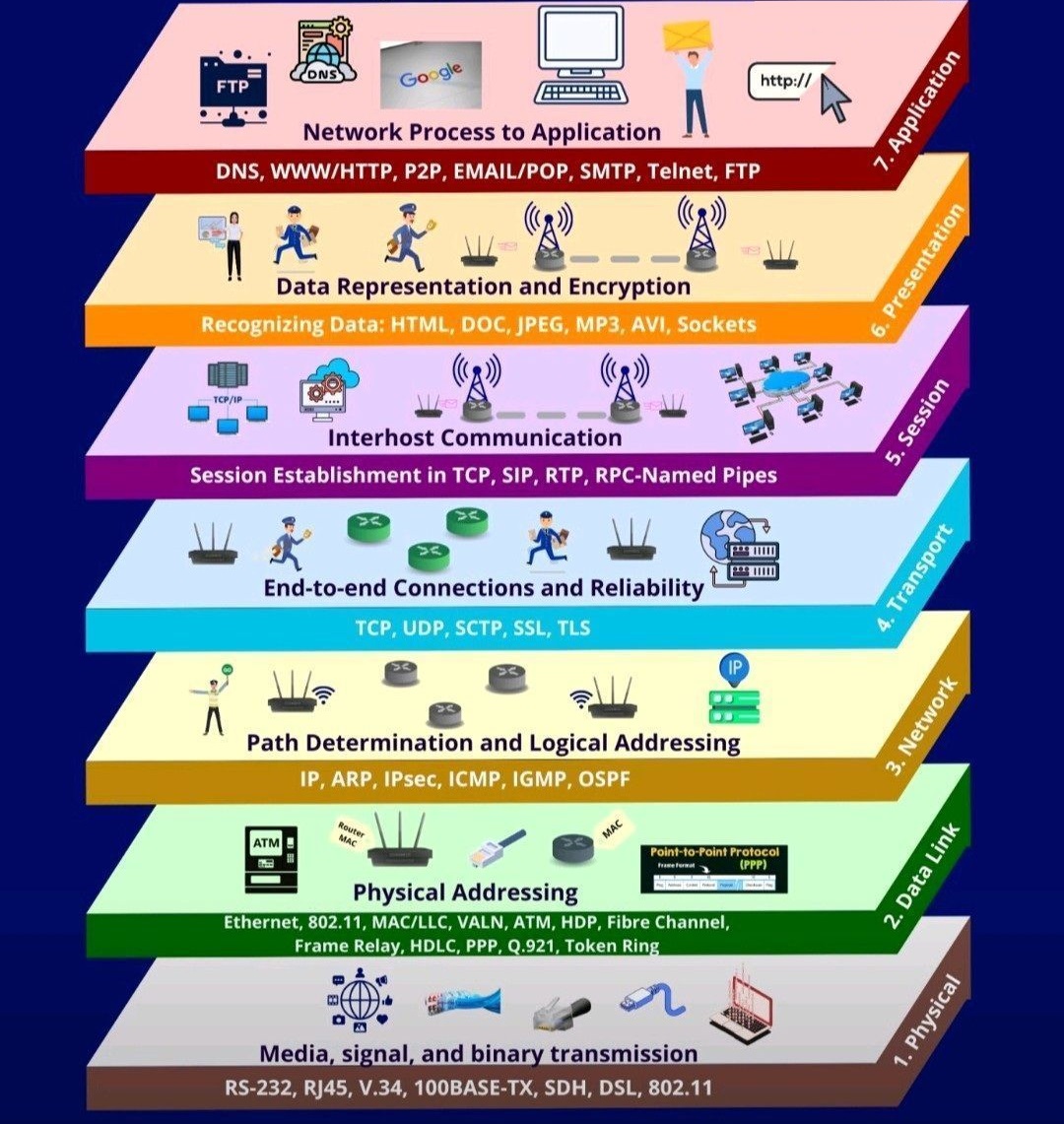
| Protocol | Name | Layer |
| DNS | Domain Name System | 7 – Application |
| HTTP | HyperText Transfer Protocol | 7 – Application |
| P2P | Peer-to-Peer | 7 – Application |
| POP | Post Office Protocol | 7 – Application |
| SMTP | Simple Mail Transfer Protocol | 7 – Application |
| Telnet | Telnet | 7 – Application |
| FTP | File Transfer Protocol | 7 – Application |
| HTML | HyperText Markup Language | 6 – Presentation |
| DOC | Microsoft Word Document | 6 – Presentation |
| JPEG | Joint Photographic Experts Group | 6 – Presentation |
| MP3 | MPEG-1 Audio Layer III | 6 – Presentation |
| AVI | Audio Video Interleave | 6 – Presentation |
| Sockets | Network Sockets | 6 – Presentation |
| TCP | Transmission Control Protocol | 5 – Session |
| SIP | Session Initiation Protocol | 5 – Session |
| RTP | Real-Time Transport Protocol | 5 – Session |
| RPC | Remote Procedure Call (Named Pipes) | 5 – Session |
| TCP | Transmission Control Protocol | 4 – Transport |
| UDP | User Datagram Protocol | 4 – Transport |
| SCTP | Stream Control Transmission Protocol | 4 – Transport |
| SSL | Secure Sockets Layer | 4 – Transport |
| TLS | Transport Layer Security | 4 – Transport |
| IP | Internet Protocol | 3 – Network |
| ARP | Address Resolution Protocol | 3 – Network |
| IPsec | Internet Protocol Security | 3 – Network |
| ICMP | Internet Control Message Protocol | 3 – Network |
| IGMP | Internet Group Management Protocol | 3 – Network |
| OSPF | Open Shortest Path First | 3 – Network |
| Ethernet | Ethernet | 2 – Data Link |
| 802.11 | IEEE 802.11 (Wi-Fi) | 2 – Data Link |
| MAC | Media Access Control | 2 – Data Link |
| LLC | Logical Link Control | 2 – Data Link |
| VLAN | Virtual LAN | 2 – Data Link |
| ATM | Asynchronous Transfer Mode | 2 – Data Link |
| HDP | High-level Data Protocol | 2 – Data Link |
| Fibre Channel | Fibre Channel | 2 – Data Link |
| Frame Relay | Frame Relay | 2 – Data Link |
| HDLC | High-level Data Link Control | 2 – Data Link |
| PPP | Point-to-Point Protocol | 2 – Data Link |
| Q.921 | ITU-T Q.921 | 2 – Data Link |
| Token Ring | Token Ring | 2 – Data Link |
| RS-232 | RS-232 | 1 – Physical |
| RJ45 | RJ45 Connector | 1 – Physical |
| V.34 | V.34 Modem Standard | 1 – Physical |
| 100BASE-TX | 100BASE-TX Ethernet | 1 – Physical |
| SDH | Synchronous Digital Hierarchy | 1 – Physical |
| DSL | Digital Subscriber Line | 1 – Physical |
Technical abbreviations
| Abbreviation | Full term |
| BOOTP | Bootstrap Protocol |
| CIP™ | Common Industrial Protocol |
| CJC | Cold Junction Composition |
| COS | Change of state |
| CST | Coordinated System Time |
| DHCP | Dynamic Host Configuration Protocol |
| DINT | Signed double integer |
| DLR | Device Level Ring |
| GSV | Get System Value |
| HMI | Human Machine Interface |
| IOT | Immediate Output |
| IP | Internet Protocol |
| JSR | Jump to Subroutine |
| MCR | Master Control Relay |
| MSG | Message |
| NEC | National Electrical Code |
| QoS | Quality of Service |
| RPI | Requested packet interval |
| RTB | Removable terminal block |
| RTD | Resistance Temperature Detector |
| RUIP | Removal and insertion under power |
| SD | Secure Digital |
| SELV | Safety Extra Low Voltage |
| SINT | Signed short integer |
| SNMP | Simple Network Management Protocol |
| SSV | Set System Value |
| TCP | Transmission Control Protocol |
| USB | Universal Serial Bus |
| UTC | Coordinated Universal Time |